Lebra Shield vs. GovQA for school districts
Evaluate Shield and Granicus Records Request Management, formerly GovQA, across department collection, review, estimates, approval and retention.

A public records request involving central office, IT and business services is a useful test of any records platform. The challenge is not only finding documents. Someone must track missing contributions, resolve review questions, approve the release and preserve the district’s record of what happened.
This guide compares evaluation questions for Lebra Shield and Granicus Records Request Management, formerly GovQA. It is written by Lebra using vendor documentation and Shield implementation documentation reviewed on November 10, 2026. It is not an independent ranking or comparative performance study.
What Granicus documents
Granicus describes Records Request Management as covering intake, gathering, review, redaction, release and reporting. Its product page also describes public portals, configurable assignments and escalations, estimates and payments, similar-request handling, and email and audiovisual processing. Confirm the configuration and services included in your proposal. Granicus Records Request Management
GovQA therefore should not be characterized as a simple intake tracker. The relevant question is how its proposed configuration fits the district’s staffing, record types and implementation capacity.
Ask the vendor to demonstrate a request involving multiple departments and an incomplete collection. A prepared request with every document already uploaded tells you little about how the team will coordinate the difficult part.
What Shield brings to the process
Shield’s documented school-district workflow connects scope confirmation, imported-record review, sorting, people confirmation, redaction decisions, optional attorney approval and response delivery. It includes public request intake, requester correspondence and a status page.
The current department workflow lets a custodian ask contacts for estimates and files, then bring their supplied records into the request. That creates a specific place to test the handoff between the person collecting material and the person reviewing it.
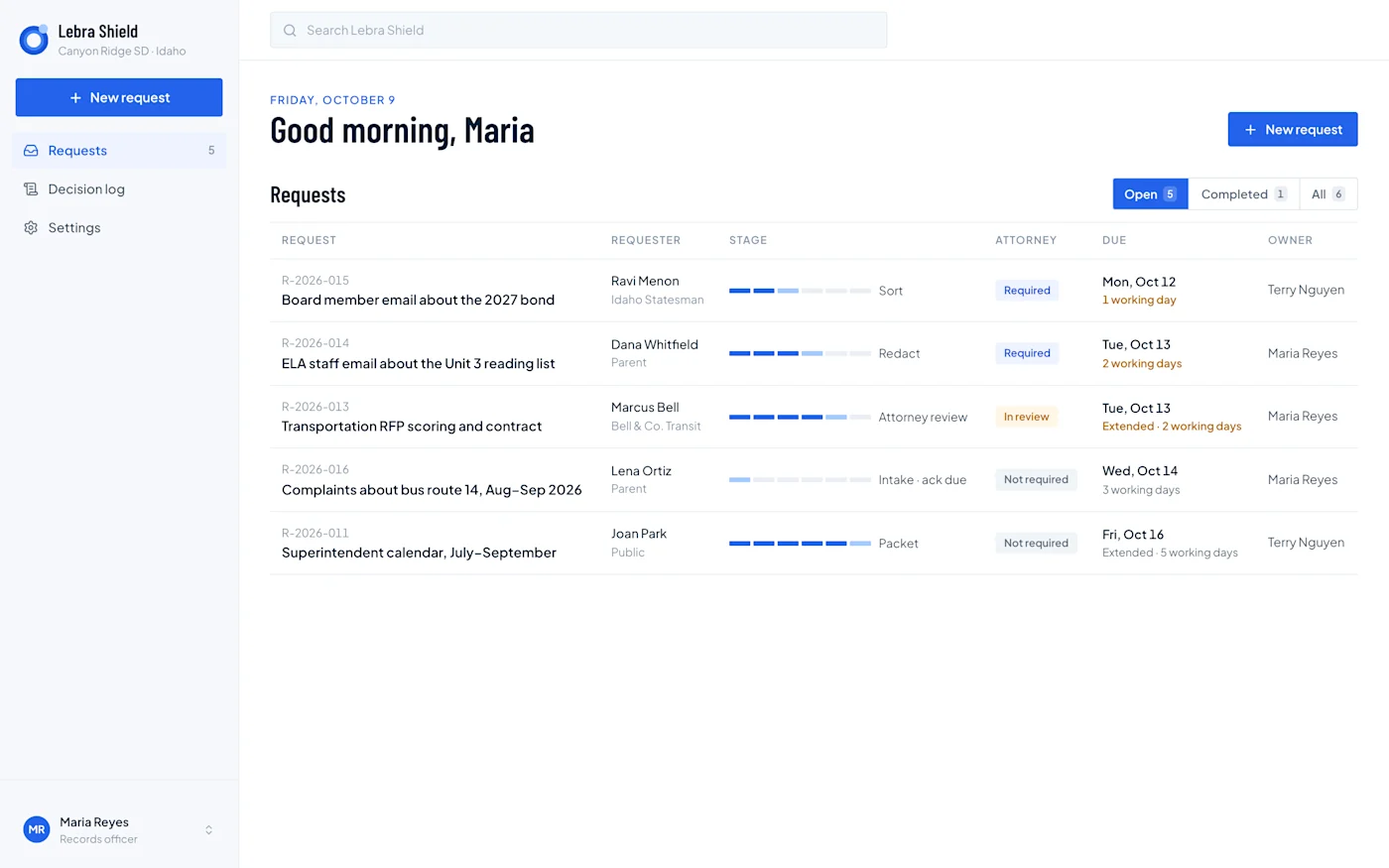
Shield demonstration dashboard with fictional Canyon Ridge requests. It illustrates owners, stages and due dates across the team’s workload; it does not show a real district’s requests or measured outcomes.
During a demo, ask who owns an overdue contribution and what a backup custodian can see. A useful platform makes missing work understandable without requiring everyone to read the entire record collection.
Walk through a multi-department scenario
Use a fictional request about a school transportation procurement. IT has emails, business services has the bid documents, and a department contact has a spreadsheet and supporting attachments. One document needs counsel’s attention; another fails extraction.
Ask each vendor to show:
How the custodian defines the records sought from each department.
How contacts report whether they have responsive material.
How estimates and subsequent instructions are recorded.
Where contributed files appear and who can access them.
How the custodian reconciles the collection against the request.
How a review question reaches the authorized decision-maker.
How the final response relates back to the collected records.
If a step occurs outside the product, write it into the evaluation. A manual step can be workable, but it needs an owner, a completion signal and a way to preserve the result.
Distinguish estimates from payment processing
Fee-related requirements vary by jurisdiction and request. Start by identifying which tasks the district actually needs the platform to perform: collecting internal estimates, preparing a reviewed fee letter, invoicing, recording payment or accepting online payment.
Shield’s documented workflow includes department estimates and itemized fee-estimate letters. Its current scope does not include fee invoices and payment collection. Do not assume an estimate screen is a payment system.
For Granicus, ask the vendor to demonstrate the quoted estimate, invoice and payment configuration end to end. Identify any payment-provider costs, accounting handoffs and implementation responsibilities. Compare the same required workflow rather than giving both products a generic “fees” checkmark.
Test the source formats your district actually has
An email-heavy request and a video-heavy request create different review needs. Build the demonstration around the file types that drive your staff time.
Shield’s documented scope centers on uploaded records, including Google Vault MBOX/EML and metadata, with support for several standalone document types. OCR, PST, general Microsoft 365 imports and live collection connectors should not be assumed available. PDFs and reproduced Word or spreadsheet content require human visual review; scanned or image-based material needs appropriate manual handling.
Ask Granicus to demonstrate the corresponding workflow in the proposed package. If audiovisual review matters, include it explicitly in the scope and pricing. Do not infer that a text-document demonstration establishes audio or video capability.
Make approval and delivery visible
Shield supports optional attorney review. When it is enabled, the custodian sends a reviewed draft to counsel. Otherwise, an authorized custodian can approve the response. Review decisions are locked for final production, and delivery remains a separate action.
For both products, ask what happens when the approver returns the draft or a reviewer finds an error after preparation. The district should know which version is approved and whether a changed decision requires another review.
Open the final output outside the application. Check attachments, text around redacted passages, the letter and record identifiers. Require an explanation for any source file that did not appear in the response.
Plan implementation and retention together
Ask Granicus which workflows require vendor configuration, who maintains them and how changes are handled after launch. Ask Shield which state pack and deployed features fit the district; its documented packs currently cover Idaho and Kansas.
Retention also deserves an explicit decision. Shield purges working request content on closure and retains a content-free closure record. Export the production and required audit material before closing. A district expecting long-term archival storage inside the request platform should treat that as a separate requirement.
Request comparable proposals for users, volume, storage, training, support, integrations and data export. Use the software buyer’s guide to distinguish demonstrated features from planned or configured work. Ask Lebra for a walkthrough using your multi-department scenario.
See what Lebra Shield can do for your district.
Schedule a demo