Student privacy and public records redaction: a school district review checklist
A practical school district privacy checklist covering ambiguous identities, context, attachments, reviewer decisions, final-file checks and Shield workflows.

A good redaction review asks what a reader could learn from the whole record, not only whether a student’s name has been removed. Context can survive in the subject line, a quoted reply, an attachment or a distinctive description of an incident.
For school district public records teams, privacy review is a sequence of decisions: identify the responsive material, understand the people and context, decide what may be disclosed, inspect the output and document approval. This guide offers a practical review method and explains how Shield supports that work. It is not a legal opinion; uncertain disclosure questions belong with the district’s authorized privacy and legal reviewers.
Start with the education-record question
The Department of Education explains that personally identifiable information in education records includes direct identifiers and information that can identify someone indirectly. Removing a name does not necessarily remove the identifying context. The applicable FERPA analysis also depends on the record and the circumstances of disclosure. Department of Education: personally identifiable information · FERPA regulations and guidance
Consider a fictional email about the only student in a small program who experienced a distinctive incident. Even without a name, a reviewer may need to assess whether the description identifies that student. That is a context question, not simply a search-and-replace task.
Do not turn “mentions a student” into an automatic rule to withhold an entire record. Ask the authorized reviewer to determine what is protected, what can be separated and what explanation is required.
Keep responsiveness separate from protection
First determine whether the record responds to the request. Then evaluate disclosure. A responsive message containing protected information should not disappear into a “not relevant” category merely because it is difficult to review.
Shield’s Sort stage supports the first decision. Reviewers see suggestions and make the district’s responsiveness call before moving into the next review work.
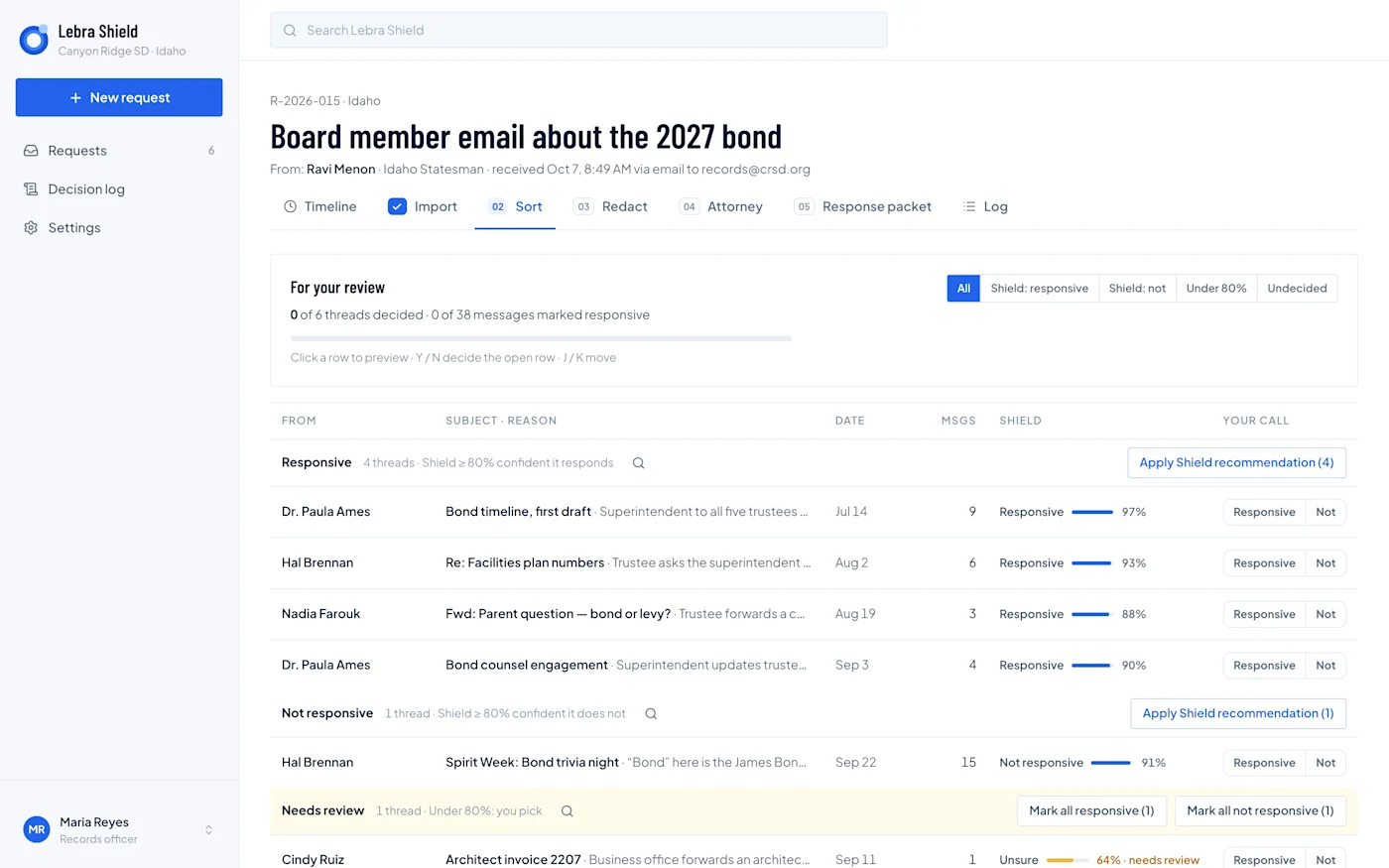
Shield demonstration Sort screen with fictional Canyon Ridge records. It illustrates the distinction between a software suggestion and the district reviewer’s decision; demo percentages are not accuracy guarantees.
Record the reason for exclusions and withholdings in the appropriate place. A colleague should be able to explain whether a record was outside scope, duplicated, withheld or included with redactions.
Confirm who each person is
The same name may refer to a teacher and a student. A first name in a reply may be ambiguous even if a full name appears elsewhere. Reviewers need the surrounding messages and the ability to correct assumptions.
Shield’s current documented people-confirmation process proposes identities and roles from the records, then asks the custodian to confirm or correct them. Different people with the same name can be kept separate. Confirmed context informs later redaction suggestions. The workflow does not require uploading an SIS roster.
A practical reviewer checklist is: who is the person, what evidence supports that role, does the name refer to the same person throughout the thread, and is any ambiguity still unresolved? If the answer is uncertain, preserve the question rather than forcing a confident label.
Inspect more than the message body
Work systematically through the subject, sender and recipient fields, quoted replies, signatures, attachments and associated documents. A reply can repeat a passage the reviewer already removed elsewhere. A file name can itself reveal context.
Give each attachment a disposition. Do not assume that a redacted email body means its attached PDF or spreadsheet is safe to release. Review original appearance where layout matters, and check content that an extracted-text view may represent differently.
Shield’s documented record support includes human visual review of PDFs and reproduced Word or spreadsheet content. It does not establish OCR or image-region redaction for scanned pages. Unsupported or failed extraction requires resolution; it is not evidence that the file contains nothing sensitive.
Evaluate a proposed redaction as a decision
For each significant suggestion, ask four questions: what information is being concealed, why is that action justified, what public information can remain, and who can resolve a disagreement?
Shield supports review of proposed redactions rather than making the district’s legal decision. The custodian can accept, reject or correct suggestions and route unresolved matters through the approval process. Keep the reviewer’s reasoning tied to the record.
Use a fictional challenge set during training: two people sharing a name, a reference that identifies a person indirectly, an unnecessary proposed redaction and a sensitive passage that was not flagged. The exercise teaches staff to inspect both suggestions and omissions.
Use counsel review where the district requires it
Some questions can be resolved through established district policy; others require counsel. Define the escalation rule before the team is under deadline pressure.
Shield’s documented workflow allows the custodian to enable attorney review for a request. A reviewed draft goes to counsel, who can approve or return it. Where attorney review is not enabled, an authorized custodian approves the response. Approval locks decisions for final production but does not itself deliver the response.
Keep internal legal discussion separate from the requester-facing explanation. A public response should accurately state the district’s decision without exposing private review notes merely because they were useful during preparation.
Inspect the final files, not only the preview
Download the exact production and open it in the tools the recipient is likely to use. Search for values intended to be removed. Try selecting and copying text around the redactions. Review attachments, file names and relevant metadata.
Also check the visible result. A technically removed passage can leave a surrounding description that still identifies someone. Conversely, an overly broad redaction may hide unrelated public information. The final reviewer should examine both privacy protection and the readability of the release.
These are operational checks proposed by Lebra, not a guarantee of compliance or a substitute for a qualified reviewer. Record what was checked, which version was approved and who authorized delivery.
Retain the decision trail before closing
Keep the district’s required copy of the request, approved output, delivery evidence and review history in its approved retention system. Resolve any preservation obligation before deleting working content.
Shield purges working request content when the custodian closes it, retaining a content-free closure record. Export the required material first. The requester’s status-page download is available while the request remains open; it should not be the district’s only retained copy.
Use the public records toolkit to assign these checks, and schedule a Shield demonstration with fictional records that test ambiguity, attachments and final-file review. Product scope in this article was checked on November 10, 2026; confirm your district’s deployed configuration and state support.
See what Lebra Shield can do for your district.
Schedule a demo